Categories are the core of the Fyvel metadata layer. They are your own classification system, independent of the tax chart of accounts. With categories you decide how bookings appear in management reporting.

Examples of categories

Categories support a reporting logic that goes beyond classic accounting:
  • Revenue, course 2025-01 — to analyse the profitability of individual courses at a training company
  • Ongoing team costs, team events, offsites — to separate ongoing and one-off team costs
  • Müller tax advisory | payroll/accounting, SEO agency — for detailed cost control in consulting
  • Expansion project XYZ — for budget tracking of a specific strategic project

Create categories

Click “Create category” and fill in:
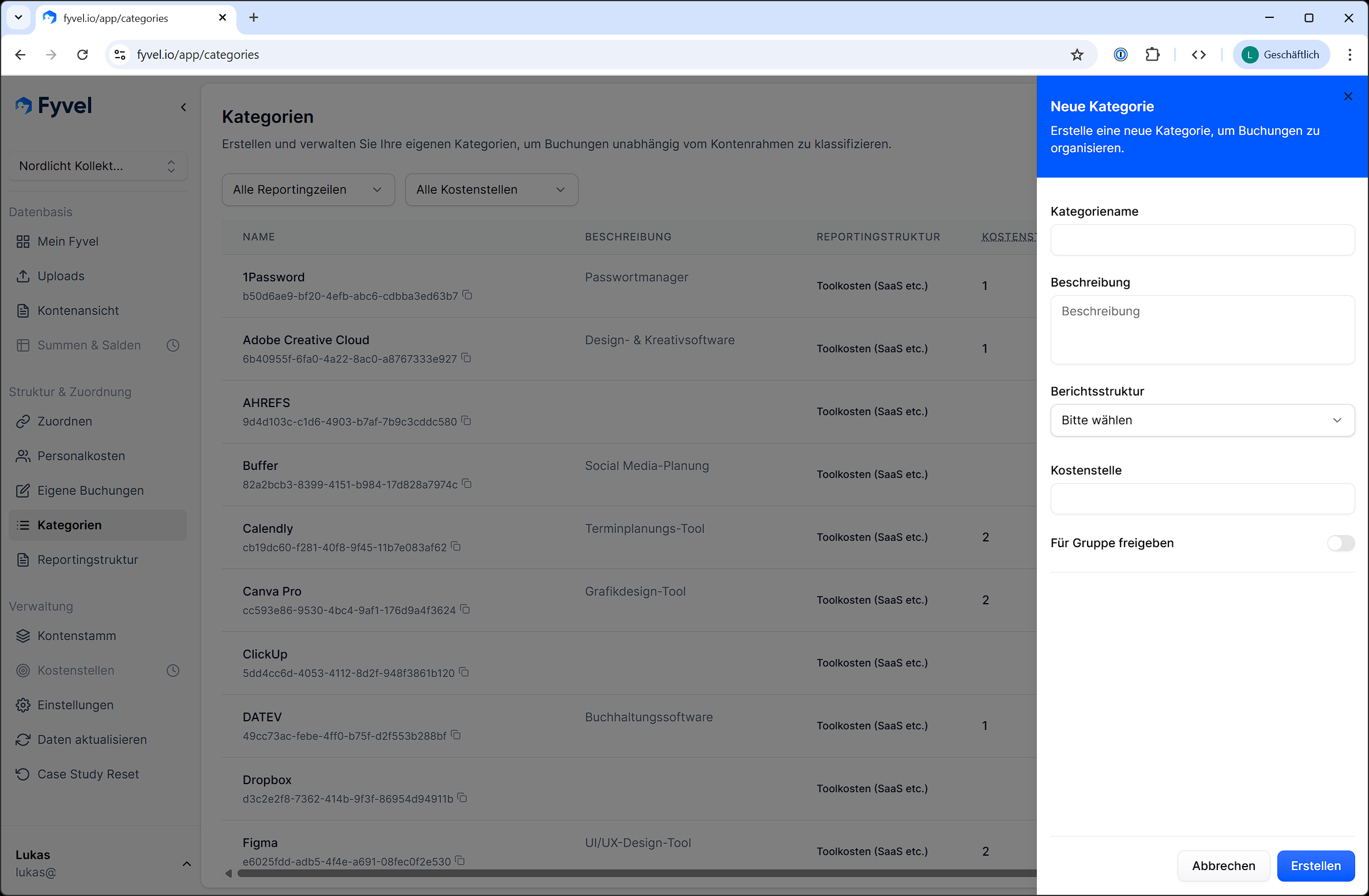
Dialog in Fyvel for creating a category with name, description, cost center, and reporting section

Dialog for creating a category

Group-wide categories

Categories can be marked as shared across the group. They are then visible in every company of your organisation. That is useful when you want one classification across several companies.

Filter categories

Use the filter to narrow categories by reporting section. That helps when you have many categories and want to work in one section.

Edit and delete categories

Click an existing category to change the name, description, cost center, or reporting section. Categories can also be deleted. Existing mappings of bookings to that category are removed.

Tip

You can also create categories directly on the Mapping page, without opening the Categories page. That keeps you in the flow.