> ## Documentation Index
> Fetch the complete documentation index at: https://docs.fyvel.io/llms.txt
> Use this file to discover all available pages before exploring further.
# DATEV Unternehmen Online
> Export account-ledger CSVs from DATEV Unternehmen Online and upload them to Fyvel each month
### Overview
This page describes the monthly path through **DATEV Unternehmen Online**: you export the account-ledger view as CSV and upload the file to Fyvel.
An overview of every import path is on [Uploads](/en/documentation/getting-started/uploads).
This path requires that **you** have access to DATEV Unternehmen Online. Only then can you control the report settings that this import depends on. If the tax advisor creates the export, the wrong files often come back: a PDF, the old account-ledger view, a full-year view, or an export without creditor and debtor accounts. If you work without your own access, the [GDPdU year upload](/en/documentation/getting-started/datev-gdpdu) is the more reliable path, because the format is standardised.
To export the **personnel cost overview** as CSV (for upload on the Personnel costs page in Fyvel), see [Personnel costs](/en/documentation/working-with-fyvel/personnel-costs#export-csv-from-datev-unternehmen-online).
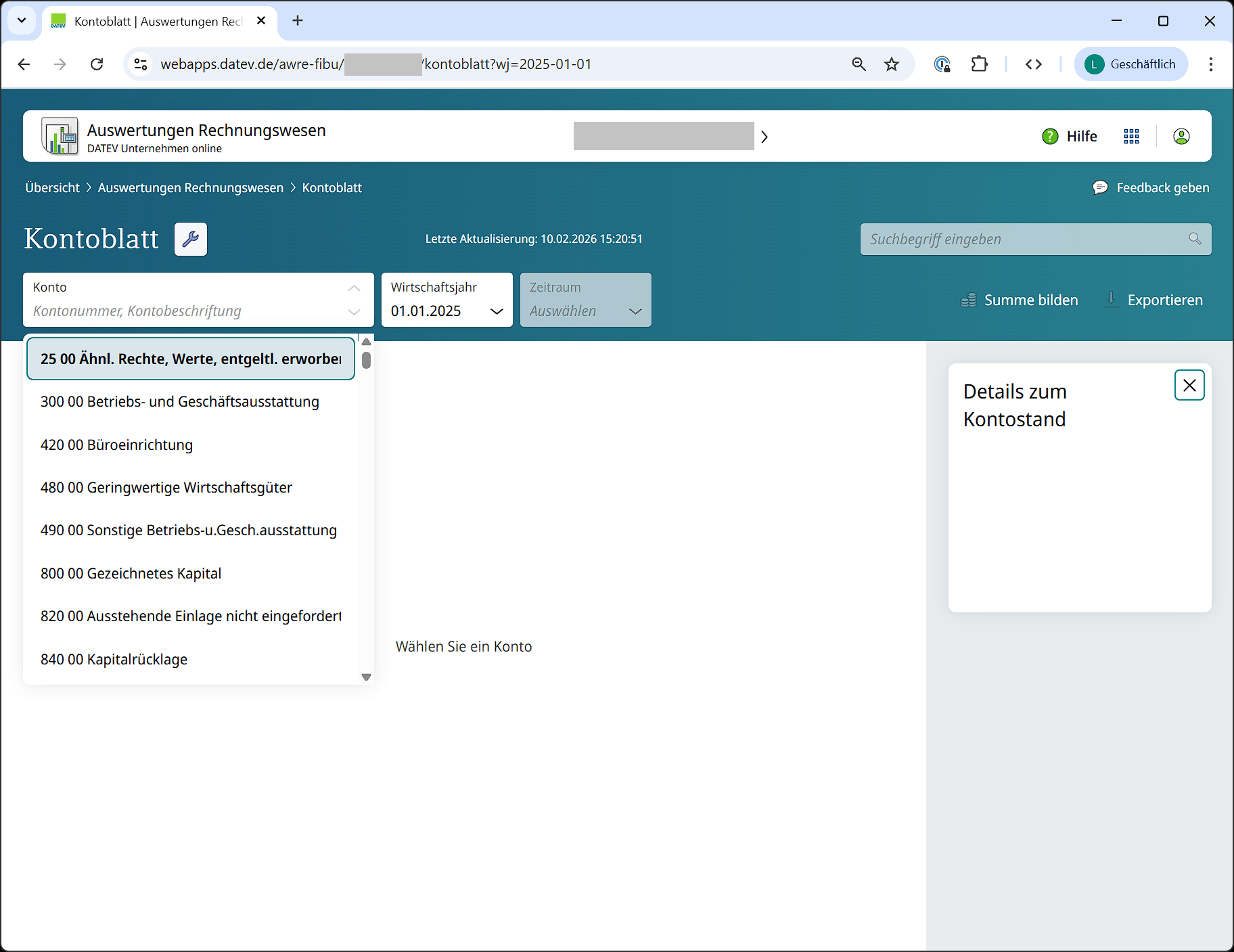
The accounting import in Fyvel is based on a report provided in DATEV Unternehmen Online: **"Kontoblatt (neue Ansicht)"** (account ledger, new view). This view is often not enabled by default, but the tax advisor can turn it on without difficulty.
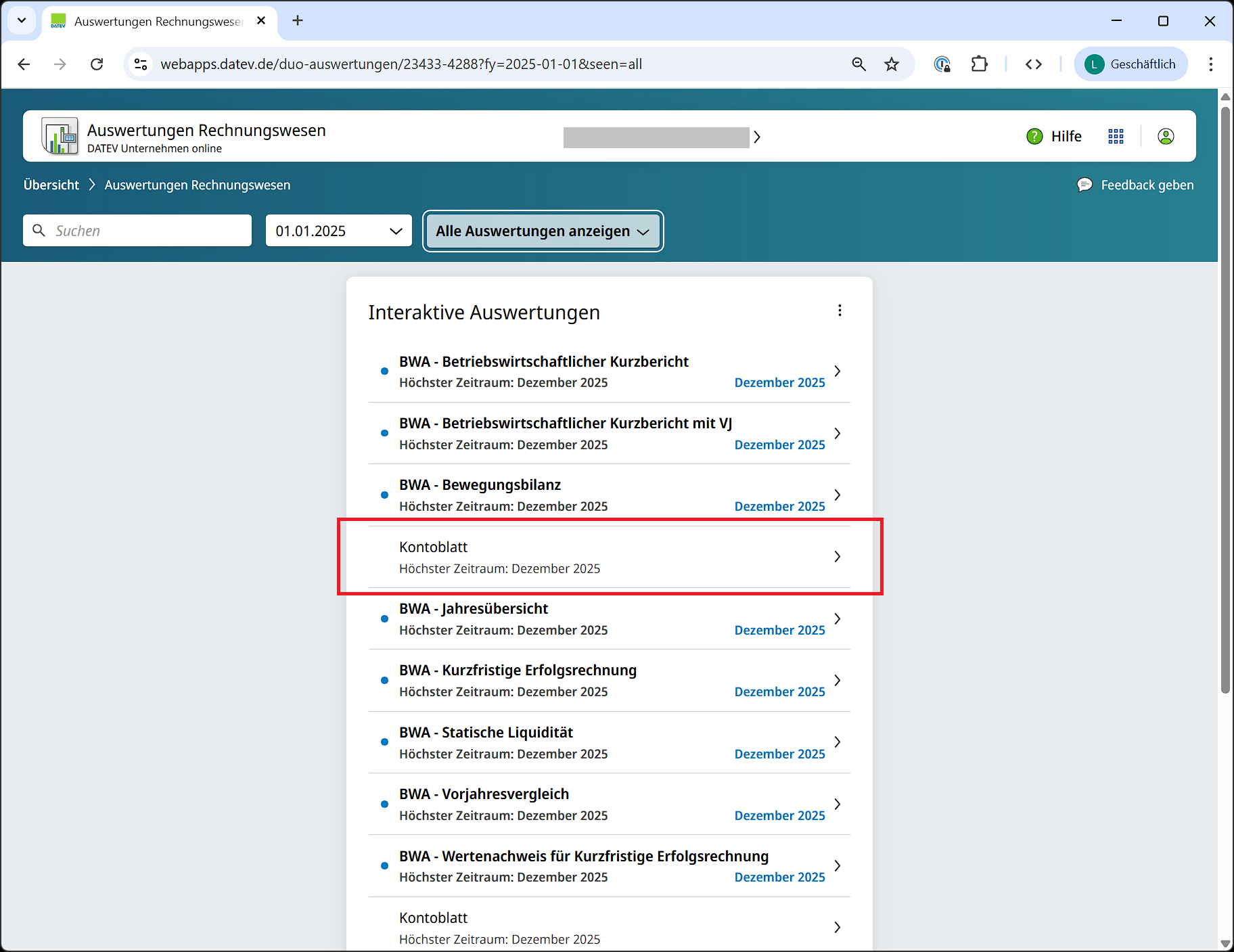
 **Important:** The old view only produces PDFs and is not usable in Fyvel.
### DATEV report settings
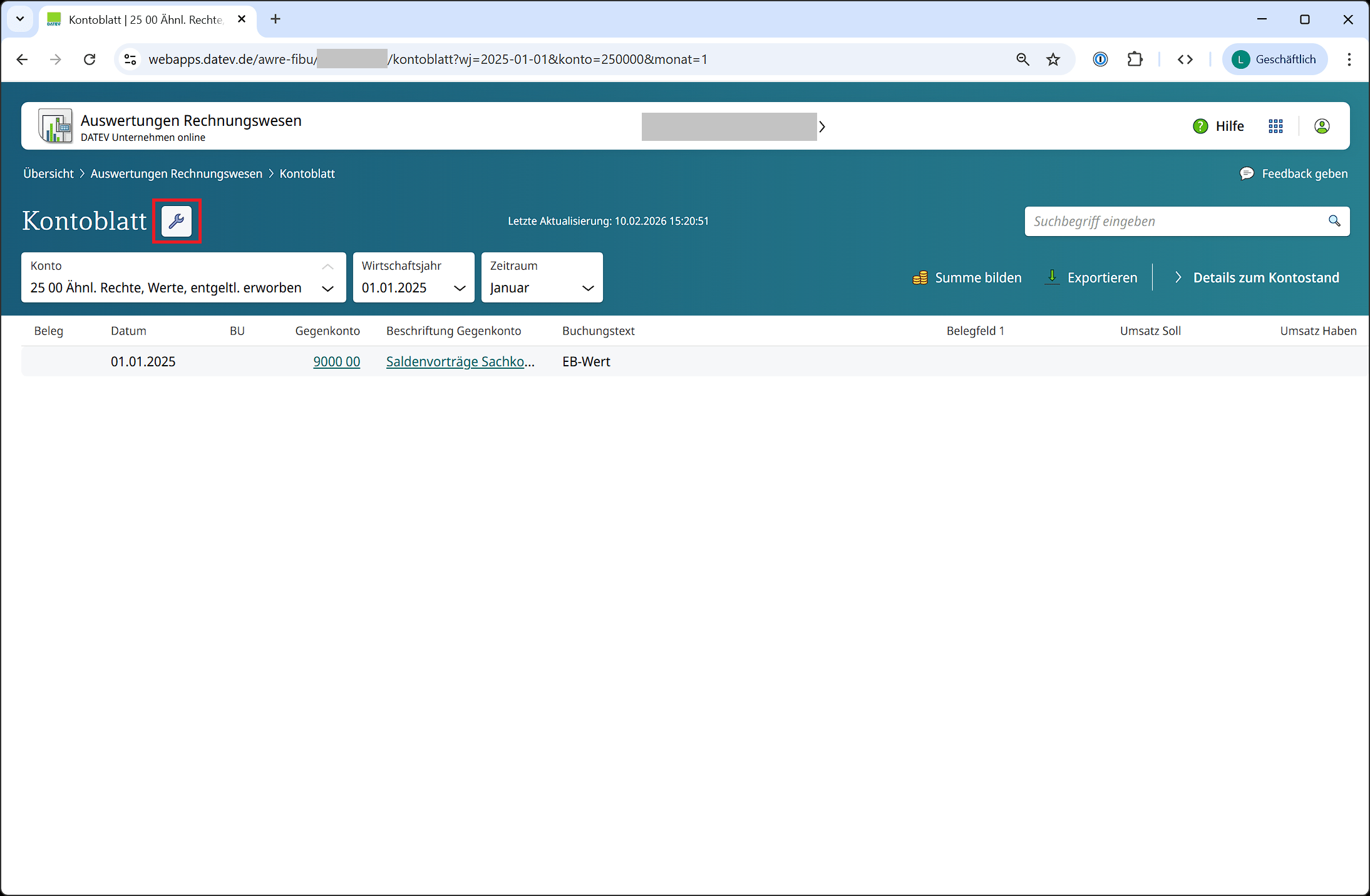
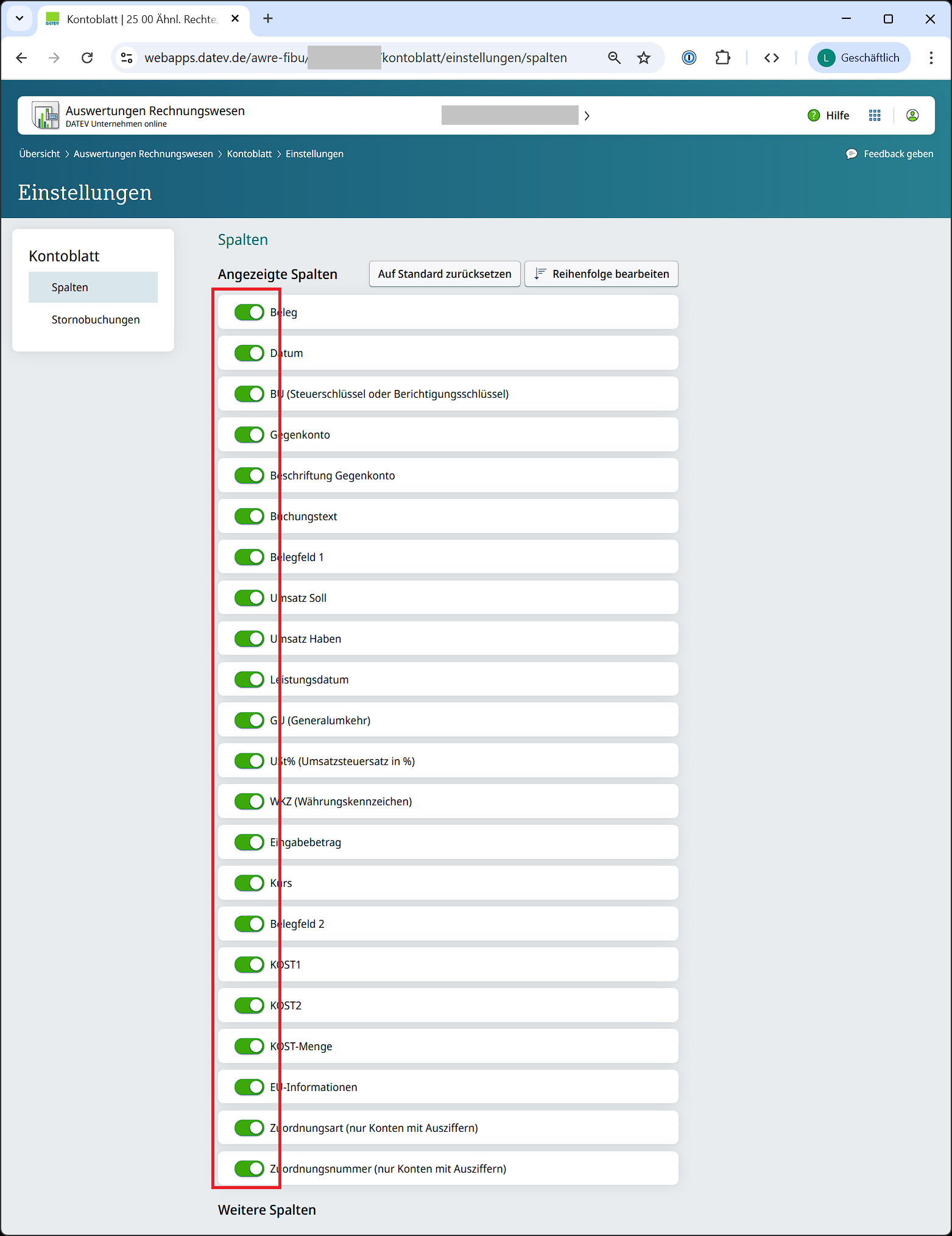
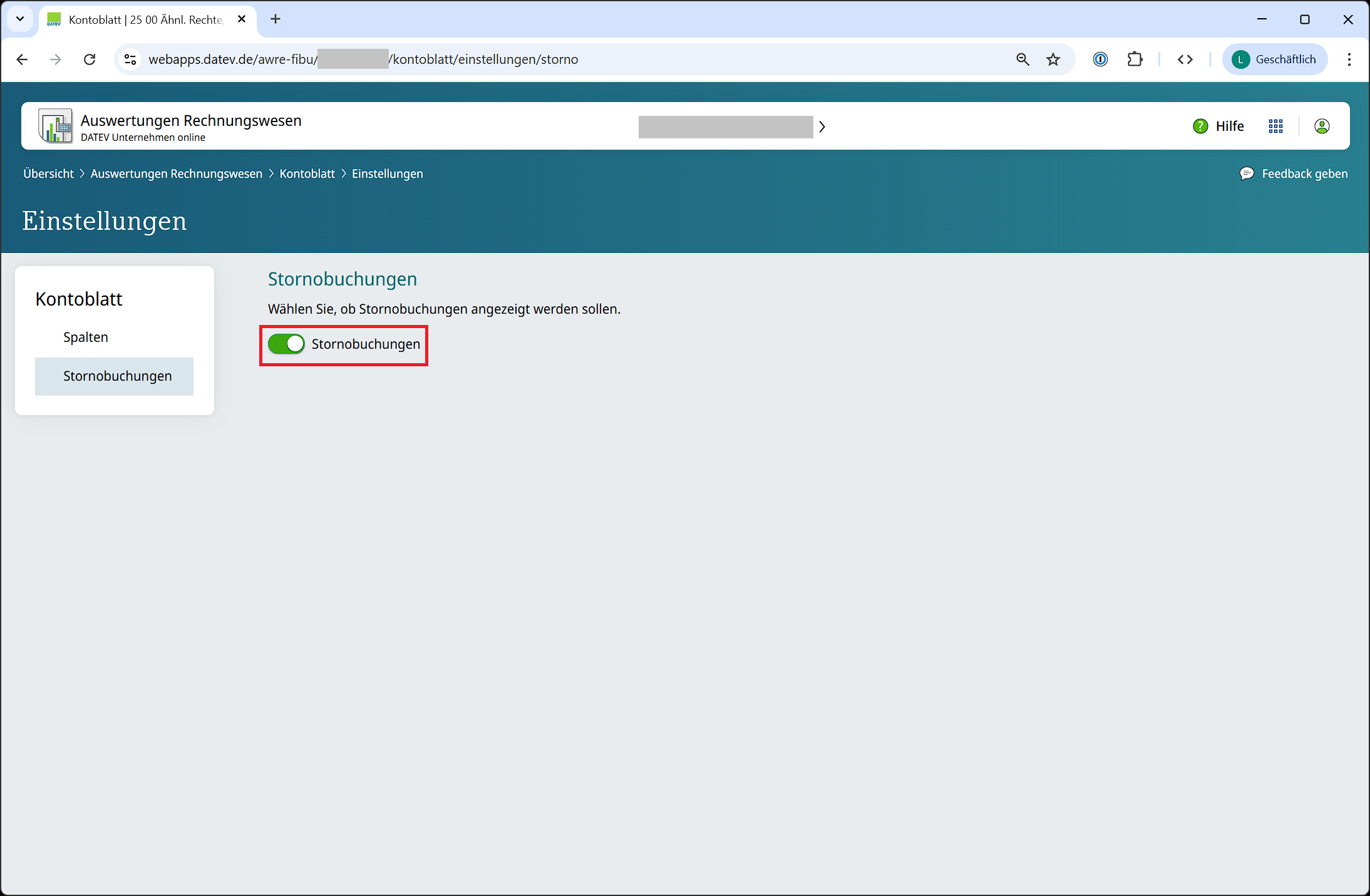
The view is easy to configure. Keep in mind:
* The settings are **per user** and may need to be set separately for each user.
* The settings stay saved after you log out.
**Important:** The old view only produces PDFs and is not usable in Fyvel.
### DATEV report settings
The view is easy to configure. Keep in mind:
* The settings are **per user** and may need to be set separately for each user.
* The settings stay saved after you log out.
 ### Language of the DATEV interface
Fyvel expects the account-ledger export from the **German** DATEV interface.
If DATEV is set to **English** (or another language), the CSV structure changes: typically the second row is a run of semicolons (`;;;;;;`) instead of a blank line. Those files cannot be processed.
1. Set the language in DATEV to **German**.
2. Sign in again so the setting takes effect.
3. Export the account ledger again and upload the new file to Fyvel.
**Screenshot to follow.** An image of the DATEV language setting will appear here.
### Download the data
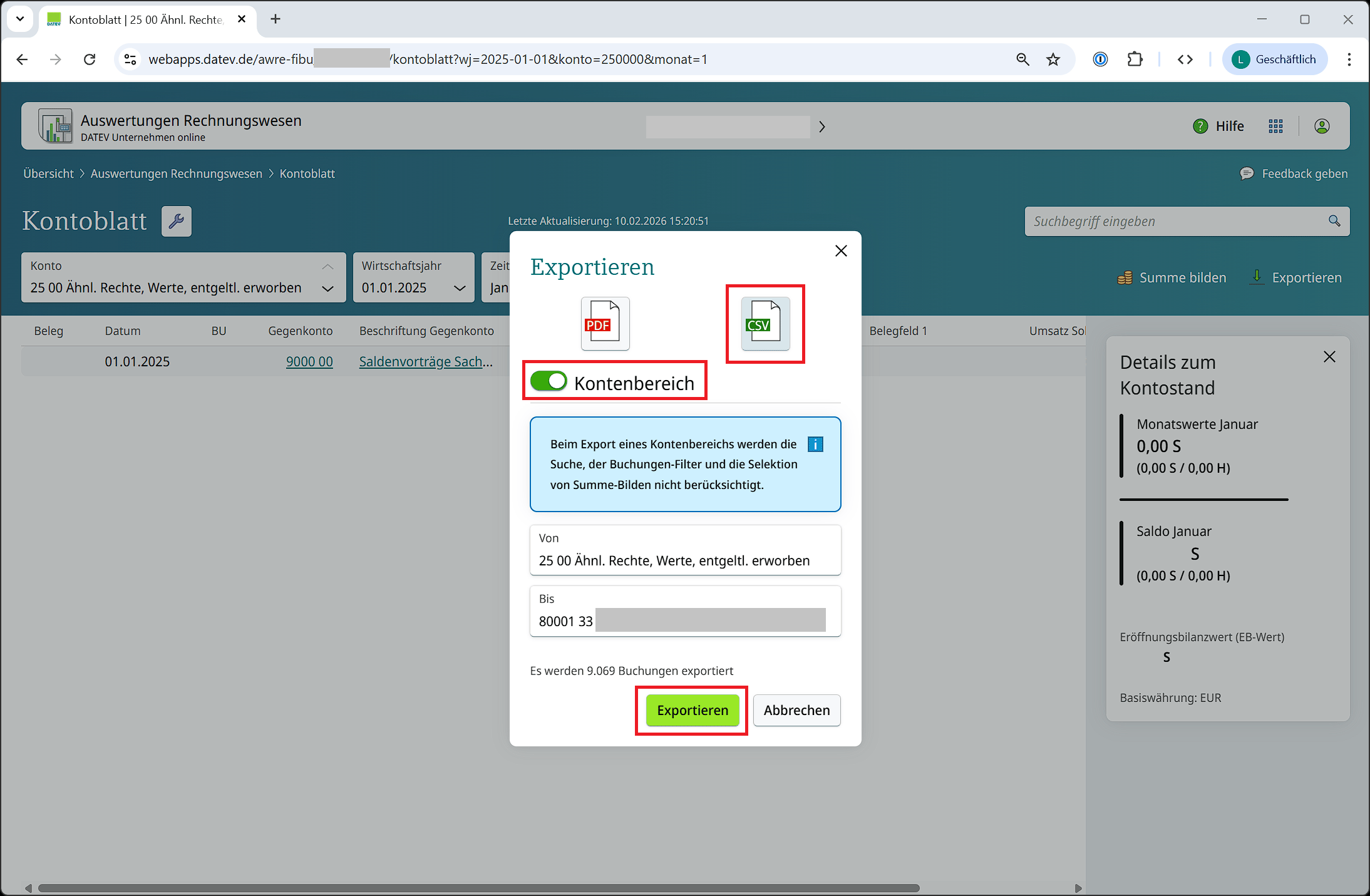
Use the export button in DATEV to download the data. Check the following:
* Choose **CSV** rather than PDF
* Select **all accounts**, not only general-ledger accounts. **Creditor and debtor accounts** must be included, otherwise the import fails because bookings point at missing offset accounts.
* Download **by month**, not a full-year view
* Use the **German DATEV interface**
### Language of the DATEV interface
Fyvel expects the account-ledger export from the **German** DATEV interface.
If DATEV is set to **English** (or another language), the CSV structure changes: typically the second row is a run of semicolons (`;;;;;;`) instead of a blank line. Those files cannot be processed.
1. Set the language in DATEV to **German**.
2. Sign in again so the setting takes effect.
3. Export the account ledger again and upload the new file to Fyvel.
**Screenshot to follow.** An image of the DATEV language setting will appear here.
### Download the data
Use the export button in DATEV to download the data. Check the following:
* Choose **CSV** rather than PDF
* Select **all accounts**, not only general-ledger accounts. **Creditor and debtor accounts** must be included, otherwise the import fails because bookings point at missing offset accounts.
* Download **by month**, not a full-year view
* Use the **German DATEV interface**
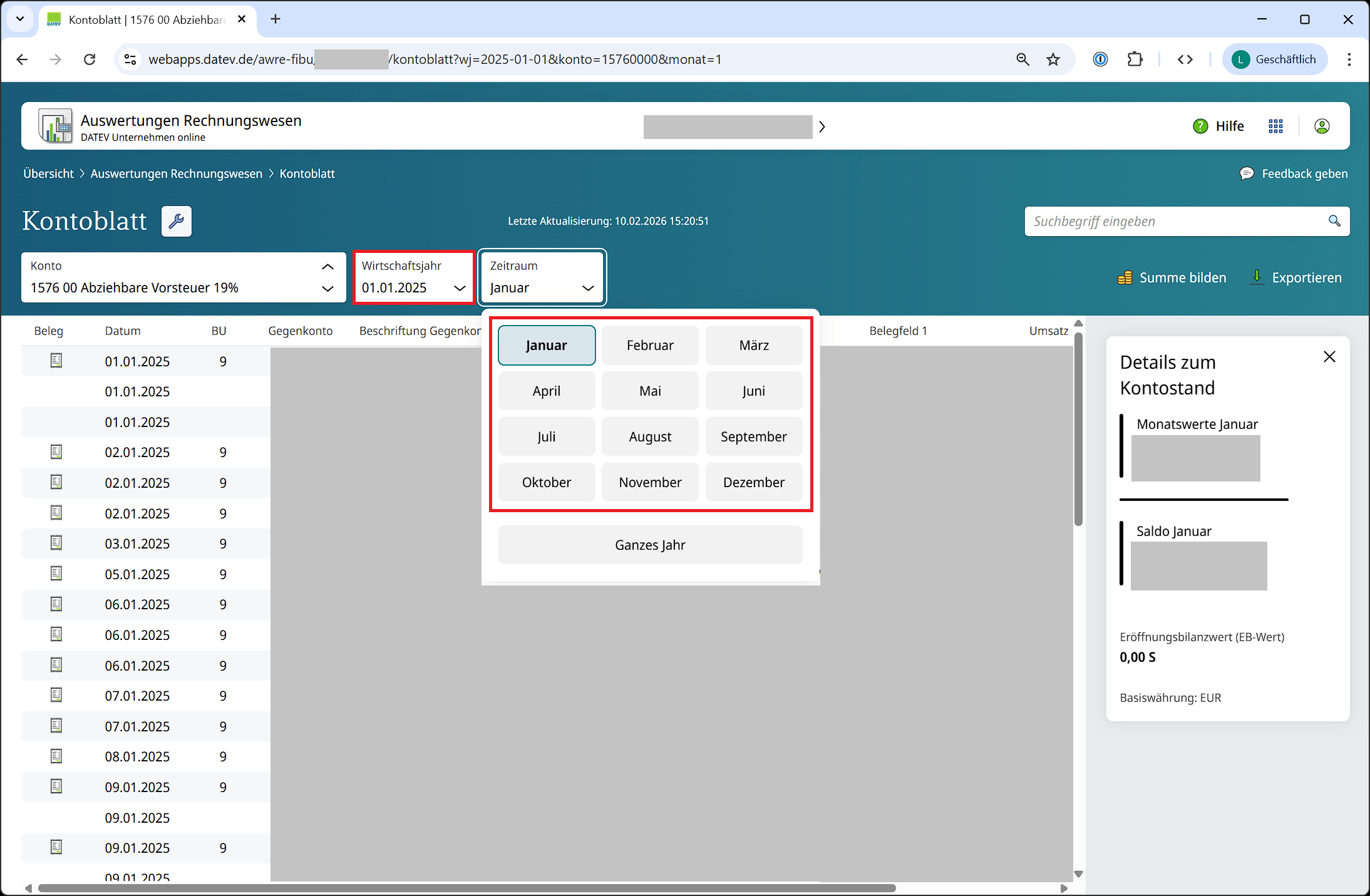
 **Note:** DATEV shows the account with the lowest number by default, often a fixed-asset account with no monthly bookings. In that case some months appear greyed out. Choose an account such as "Lohn und Gehaltsverrechnung" (payroll clearing) that is posted to every month.
### Upload in Fyvel
1. In Fyvel, open the **Uploads** page.
2. Drag the CSV files into the upload area. You can upload up to 12 files at once.
3. Fyvel processes the files in the background. You see the status in the upload table.
After successful processing, the transactions, accounts, and balances are available in Fyvel.
**Tip:** When reporting for April, for example, it is worth uploading January through March again, because retrospective bookings are common. If you upload each month separately, you can see on Mapping exactly which bookings were added. That is a strong basis for understanding the accounting process.
### Common error messages
| Message | Cause |
| - | - |
| **Only monthly DATEV exports are supported** | A full-year view was exported. Export one month at a time. |
| **DATEV must be set to German** | The export comes from the English interface. Change the language, sign in again, and export again. |
| **Not the expected DATEV account-ledger format** | This is not the account-ledger view (new view) as CSV. |
| **Accounts are missing from the export** | Not all accounts were selected for the download. Include creditor and debtor accounts. |
| **The company in the CSV does not match the company** | The file belongs to a different client. Check the client number in [Company settings](/en/documentation/export-and-settings/company-settings). |
***
This documentation is built and hosted on [Mintlify](https://mintlify.com), a developer documentation platform.
**Note:** DATEV shows the account with the lowest number by default, often a fixed-asset account with no monthly bookings. In that case some months appear greyed out. Choose an account such as "Lohn und Gehaltsverrechnung" (payroll clearing) that is posted to every month.
### Upload in Fyvel
1. In Fyvel, open the **Uploads** page.
2. Drag the CSV files into the upload area. You can upload up to 12 files at once.
3. Fyvel processes the files in the background. You see the status in the upload table.
After successful processing, the transactions, accounts, and balances are available in Fyvel.
**Tip:** When reporting for April, for example, it is worth uploading January through March again, because retrospective bookings are common. If you upload each month separately, you can see on Mapping exactly which bookings were added. That is a strong basis for understanding the accounting process.
### Common error messages
| Message | Cause |
| - | - |
| **Only monthly DATEV exports are supported** | A full-year view was exported. Export one month at a time. |
| **DATEV must be set to German** | The export comes from the English interface. Change the language, sign in again, and export again. |
| **Not the expected DATEV account-ledger format** | This is not the account-ledger view (new view) as CSV. |
| **Accounts are missing from the export** | Not all accounts were selected for the download. Include creditor and debtor accounts. |
| **The company in the CSV does not match the company** | The file belongs to a different client. Check the client number in [Company settings](/en/documentation/export-and-settings/company-settings). |
***
This documentation is built and hosted on [Mintlify](https://mintlify.com), a developer documentation platform.